后台作业&调度中心
如何选择使用后台作业还是对接调度服务?
提示
集成在调度中心的Job,一般是可以被人为管理并随时更改调度计划的一类工作。
集成在调度中心的Job,一般是需要关心执行进程、查看执行日志的一类工作。
后台作业的Job,一般是为了将非主干业务的一些分支业务逻辑异步解耦,如发短信、发通知等工作。
后台作业的Job,一般是处理系统的缓存更新、数据归档等本应该是系统一部分的逻辑。
后台作业的Job,一般都支持失败重试,幂等处理。
后台作业
Hangfire 是目前 net core 开源社区中较为流行的轻量化后台作业执行框架。
框架优势:
后台异步解耦
任务失败自动重试
支持多实例横向扩展
可视化界面管理
支持多种任务类型
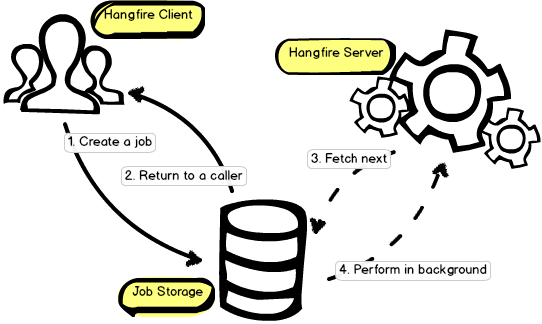
重要
在 Job 任务特别繁重的业务场景中,因 Job 会大量占用 CPU、内存、IO 等资源,此时需要把 Job 执行和主程序分开,主程序只负责创建 Job。
这样可以避免 Job 任务的执行时间过长导致主程序阻塞或主程序异常导致 Job 任务的丢失等问题,提升系统整体稳定性。
在目前开源的版本中,它主要支持 4 种后台任务执行方式:
即时触发
var jobId = BackgroundJob.Enqueue(
    () => Console.WriteLine("Fire-and-forget!")
);
延时触发
// 指定任务触发时间
var jobId = BackgroundJob.Schedule(
    () => Console.WriteLine("Delayed!"),
    TimeSpan.FromDays(7)
);
计划触发
RecurringJob.AddOrUpdate(
    "jobName",
    () => Console.WriteLine("Recurring!"),
    "*/1 * * * * *"  // 使用 corn 表达式定期执行任务
);
依赖触发
var jobId = BackgroundJob.Enqueue(
    () => Console.WriteLine("Delayed!")
);
BackgroundJob.ContinueJobWith(
    jobId, // 依赖上次任务执行完成后,再执行当前任务
    () => Console.WriteLine("Continuation!")
);
dotnet core 集成
增加依赖包
dotnet add package Hangfire.Core
dotnet add package Hangfire.SqlServer
dotnet add package Hangfire.AspNetCore
dotnet add package Hangfire.Dashboard.BasicAuthorization
初始化
{
    // 增加数据库连接字符串
    "ConnectionStrings": {
        "HangfireConnection": "Server=.\\sqlexpress;Database=HangfireTest;Integrated Security=SSPI;"
    }
}
using Hangfire;
using Hangfire.SqlServer;
using Hangfire.Dashboard.BasicAuthorization;

public void ConfigureServices(IServiceCollection services)
{
    // Add Hangfire services.
    services.AddHangfire(configuration => configuration
        .SetDataCompatibilityLevel(CompatibilityLevel.Version_170)
        .UseSimpleAssemblyNameTypeSerializer()
        .UseRecommendedSerializerSettings()
        .UseSqlServerStorage(Configuration.GetConnectionString("HangfireConnection"), new SqlServerStorageOptions
        {
            CommandBatchMaxTimeout = TimeSpan.FromMinutes(5),
            SlidingInvisibilityTimeout = TimeSpan.FromMinutes(5),
            QueuePollInterval = TimeSpan.Zero,
            UseRecommendedIsolationLevel = true,
            DisableGlobalLocks = true
        }));

    services.AddHangfireServer();
}

public void Configure(IApplicationBuilder app, IHostingEnvironment env)
{
    // ...
    app.UseStaticFiles();
    app.UseAuthentication();
    app.UseHangfireDashboard("/hangfire", new DashboardOptions()
    {
        IgnoreAntiforgeryToken = true,
        Authorization = new[] { new BasicAuthAuthorizationFilter(
            new BasicAuthAuthorizationFilterOptions
            {
                RequireSsl = false,
                SslRedirect = false,
                LoginCaseSensitive = true,
                Users = new []
                {
                    new BasicAuthAuthorizationUser
                    {
                        Login = "admin",
                        PasswordClear =  "admin"
                    }
                }
            }
        )}
    });
    app.UseAuthorization();
    app.UseEndpoints(endpoints =>
    {
        endpoints.MapControllers();
    });
}
常见业务场景举例
消息即时或延迟发送
public class FeiShuMessageService : IFeiShuMessageService
{
    private async Task<SendMessageResult> SendingMessage(
        MessageSendInput input,
        string sysName,
        string fromSys)
    {
        // ..
        try
        {
            // 如果发送时间大于当前时间,则定时发送
            if (input.SendTime > DateTime.Now)
            {
                // 指定发送时间,添加延迟执行作业
                var delay = (input.SendTime - DateTime.Now).Value;
                BackgroundJob.Schedule(() => Sending(input),delay);
            }
            else
            {
                BackgroundJob.Enqueue(() => Sending(input));
            }
            // Job添加成功,增加消息发送记录
            _feiShuRepository.CreateMsgSending(input);
        }
        catch (System.Exception e)
        {
            _logger.LogError(e, $"{e.Message}");
            throw;
        }
    }

    public void Sending(MessageSendInput input)
    {
        // 发送业务逻辑
    }

    public void ClearSuccessSendingItems(){
        // 清理发送成功的消息
    }
}
清理消息待发送表
public class Startup
{
    public void ConfigureServices(IServiceCollection services)
    {}

    public void Configure(
        IApplicationBuilder app
        ,IWebHostEnvironment env
        ,IHostApplicationLifetime lifetime
        ,IBackgroundJobClient backgroundJobClient
        ,IRecurringJobManager recurringJobManager
    )
    {
        app.UseEndpoints(endpoints =>
        {
            endpoints.MapControllers();
        });

        // 服务启动时添加定时作业,定期清理待发送表数据
        recurringJobManager.AddOrUpdate<IFeiShuMessageService>(
            "clearJob",
            service => service.ClearSuccessSendingItems(),
            "*/30 * * * *"
        );
    }
}
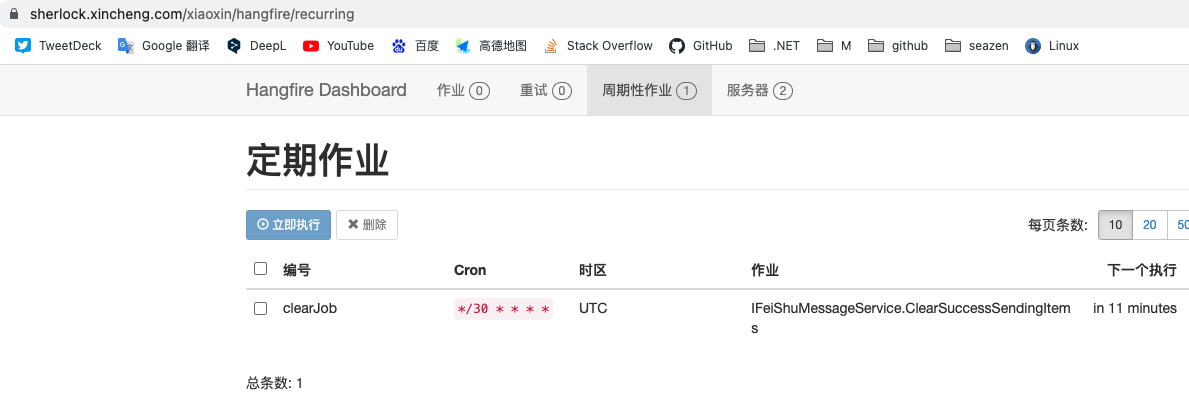
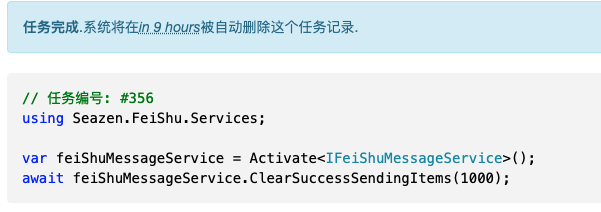
作业执行详情
配置错误失败次数及重试间隔
 1public static void AddHangfire(this WebApplicationBuilder builder)
 2{
 3    builder.Services.AddHangfire(config =>
 4    {
 5        config.UseMemoryStorage();
 6        // 设置全局失败重试次数和重试间隔
 7        GlobalJobFilters.Filters.Add(new AutomaticRetryAttribute { Attempts = 3, DelaysInSeconds = [5, 10, 30] });
 8    });
 9
10    builder.Services.AddHangfireServer();
11}
分布式锁使用
Hangfire基于数据库实现了分布式锁的实现,在业务代码中我们可以方便使用。// 定义分布式锁的key及自动释放锁超时时间 var lock_key = "msg:sms:update:lock"; var lock_timeout = TimeSpan.FromSeconds(10); // 添加分布式锁 var lock = JobStorage .Current .GetConnection() .AcquireDistributedLock(lock_key, lock_timeout); // 加锁成功,查询待数据 var batchEntities = await _messageRepository.GetEntities<Entity>("sms_sent"); var smIds = batchEntities.Select(i => i.SmID).ToList(); // 标记数据为正在处理中 await _messageRepository.UpdateSmsSentBatchState(smIds); // 主动释放锁 lock.Dispose();
关于依赖注入的说明
IOC的 官方文档 在此,详细信息可阅读相关说明。
Hangfire使用JobActivator来创建待执行实例,当执行环境没有依赖注入时,待执行类需要提供无参的构造函数来创建执行类。
但默认的JobActivator同时已经集成了netcore,Autofac,Ninject,SimpleInjector等依赖注入框架。
当前执行上下文中如果已经使用了DI执行类便可自动注入,但特别要注意,不能在后台作业的上下文中使用HttpContext。
多队列及优先级
有时我们需要对任务进行不同的优先级划分,来保证重要紧急的任务可以优先消费。
那么我们在添加 HangfireServer 时可以像下面这样配置,队列的顺序会按照数组的数据优先调度。
注意
默认的队列为: default
1services.AddHangfireServer(option =>
2{
3    option.WorkerCount = 4;
4    option.Queues = new[] { "critical", "default" ,"low"};
5});
注意
当我们使用 SqlServer 作为存储时,Hangfire 会使用下面的 sql 语句查询下一个待执行的 job。 此时, 队列的顺序是 SqlServer 的字母排序顺序,并不是配置时数组的顺序。
DELETE top (1) JQ output DELETED.Id,
DELETED.JobId,
DELETED.Queue
FROM
    JobQueue JQ WITH (readpast, updlock, rowlock, forceseek)
WHERE
    Queue IN @queues
    AND (
        FetchedAt IS NULL
        OR FetchedAt < DATEADD(SECOND, @timeout, GETUTCDATE())
    )
下面我们给后台作业指定队列优先级。
Startup.cs 添加的轮训类作业。
 1public void Configure(
 2        IApplicationBuilder app
 3        , IBackgroundJobClient backgroundJobClient
 4        , IRecurringJobManager recurringJobManager
 5)
 6{
 7    recurringJobManager.AddOrUpdate<IFeiShuBaikeService>(
 8        "Baike-RefreshAnalysisByMQ",
 9        x => x.RefreshAnalysisByMQ(),
10        "*/2 * * * *",
11        null,
12        "low"
13    );
14}
15
16// hangfire 框架添加的
17public static class RecurringJobManagerExtensions{
18    public static void AddOrUpdate<T>([NotNull] this IRecurringJobManager manager, [NotNull] string recurringJobId, [NotNull] Expression<Func<T, Task>> methodCall, [NotNull] string cronExpression, TimeZoneInfo timeZone = null, string queue = "default");
19}
即时类作业,通过
Queue属性来标记队列。1// 标记队列 2[Queue("low")] 3public async void RefreshAllData() 4{ 5 6} 7 8// 添加到队列 9 BackgroundJob.Enqueue(() => RefreshAllData());
在后台作业中获取 JobId
有时我们为了在日志中输出当前正在执行的 jobId,这个时候需要在后台作业方法上增加一个 PerformContext。如下:
[Queue("critical")]
public void GetJobId(string val,PerformContext context)
{
    string jobId = context.BackgroundJob.Id;
    Console.WriteLine($"val:{val},jobId:{jobId}");
}

// 添加任务,此时直接传入 null 即可,框架会在正在调度时赋值。
var jobId = BackgroundJob.Enqueue(() => GetJobId("xxx", null));
System.Console.WriteLine(jobId);
优化 dashboard 时间显示
Dashboard 默认显示的时间是 UTC 时间且不会显示秒,我们可以通过 JavaScript 脚本来优化显示效果。
public static void AddHangfire(this WebApplicationBuilder builder)
{
    builder.Services.AddHangfire(config =>
    {
        config.UseMemoryStorage();
        GlobalJobFilters.Filters.Add(new AutomaticRetryAttribute { Attempts = 3, DelaysInSeconds = [3, 5, 7] });

        Assembly assembly = typeof(Program).GetTypeInfo().Assembly;
        DashboardRoutes.AddJavaScript(assembly, $"{typeof(Program).Namespace}.Page.custom.js");
    });

    builder.Services.AddHangfireServer();
}
// src/Page/custom.js
$(function () {
  $(document).ready(function () {
    // jquery document loaded
    console.log("jquery document loaded");

    var updateDates = function () {
      $("*[data-moment]").each(function () {
        var $this = $(this);
        var timestamp = $this.data("moment");

        if (timestamp) {
          var time = moment(timestamp, "X");
          $this.html(time.format());
        }
      });

      $("*[data-moment-title]").each(function () {
        var $this = $(this);
        var timestamp = $this.data("moment-title");

        if (timestamp) {
          var time = moment(timestamp, "X");
          $this.html(time.format());
        }
      });
    };

    updateDates();
    setInterval(updateDates, 15 * 1000);
  });
});
调度中心
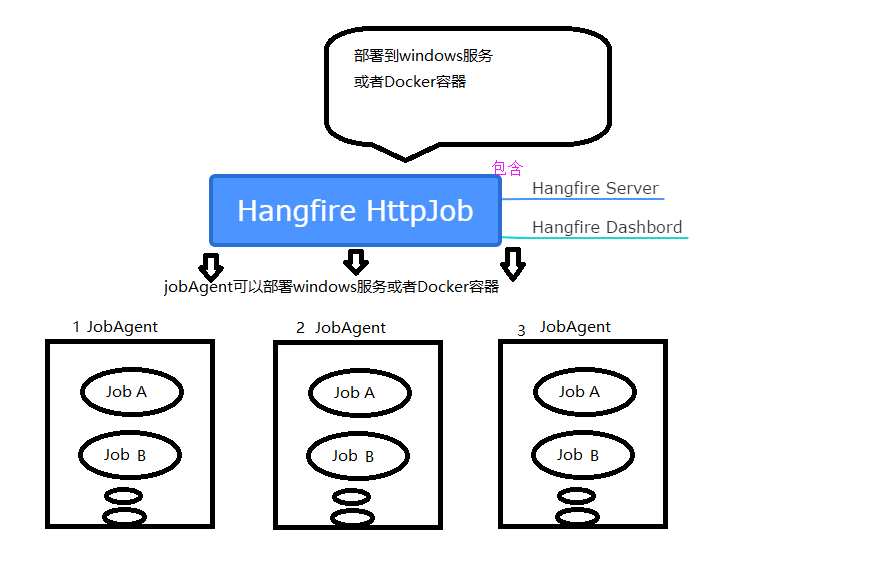
在 Hangfire 基础上,我们使用 Hangfire.HttpJob 开源框架实现我们的可视化调度中心。
调度中心优势:
执行器和调度服务分离,解耦具体业务与调度逻辑。调度由中心服务统一控制,执行器仅实现业务逻辑即可。
执行器通过异步子线程执行具体业务,避免请求并发导致的业务系统阻塞等问题,并可以完成一些长时长场景的业务处理。
可视化页面控制,可人工干预后台作业执行
执行器日志实时可视化界面查看(此功能的实现是执行器通过数据库链接直接读写了调度中心服务器的数据库,而并非基于 http 协议。是目前框架一个问题。)
架构:
如何使用 Agent 组件快速开发 job(客户端)
添加包引用
dotnet add package Hangfire.HttpJob.Agent.MssqlConsole
重要
执行器需要能访问到调度服务的数据库链接,否则会出现 JobAgent 的 job 的状态出问题! 执行器不用显示的配置调度服务的数据库链接,但在通过 http 方式调度时,调度服务会把数据库链接在请求中传递给执行器。
在执行器
JobContext上下文中可以查看: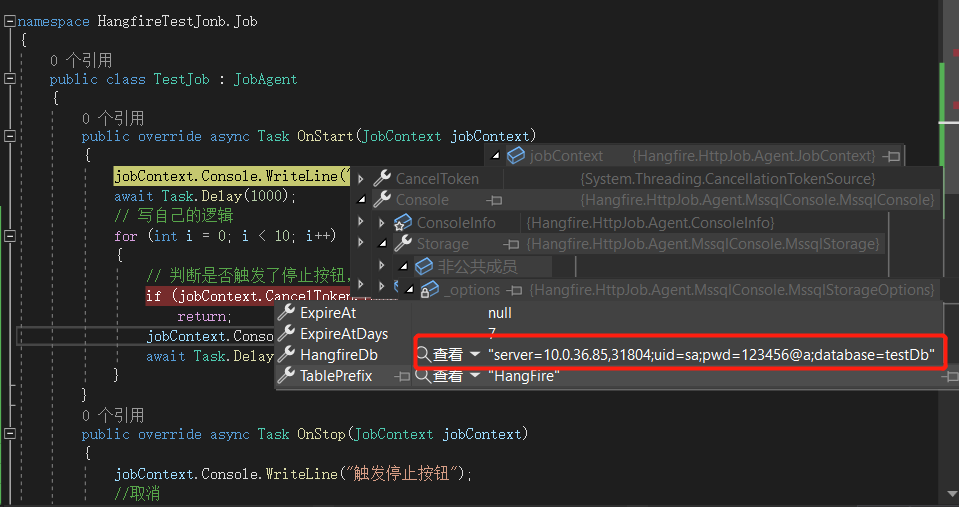
初始化执行器
public void ConfigureServices(IServiceCollection services)
{
    services.AddHangfireJobAgent();
}

public void Configure(IApplicationBuilder app, IWebHostEnvironment env)
{
    app.UseHangfireJobAgent();
}
注意
这里特别要强调下,需要将
services.AddHangfireJobAgent();放在最上面,防止被别的middleware拦截了请求。appsettings.json里面配置JobAgent的启动参数"JobAgent": { "Enabled": true, "SitemapUrl": "/jobagent", "EnableAutoRegister": true, "BasicUserName":"jobagent", "BasicUserPwd":"jobagent", "RegisterAgentHost": "https://msg.demo.com/job", "RegisterHangfireUrl": "https://job.demo.com/hangfire", "RegisterHangfireBasicName": "admin", "RegisterHangfireBasicPwd": "admin" }
字段说明:
字段名称
字段备注
Enabled代表是否启用 JobAgent
SitemapUrl代表 JobAgent 的请求地址 默认"/jobagent"
EnabledBasicAuth代表是否开启 basicAuth 认证 如果 true 需要设置下面 2 个参数
BasicUserNamebasicAuth 认证的用户名
BasicUserPwdbasicAuth 认证的密码
EnableAutoRegister是否开启 JobAgent 内的 job 自动注册 默认为 false
RegisterAgentHost当前 Agent 的启动 Url,注意得让调度端能够访问到才行 例如:"https://localhost:5001"
RegisterHangfireUrlhangfire 调度端的 url 例如:"https://localhost:6001/job/hangfire"
RegisterHangfireBasicNamehangfire 调度端配置的 basic 认证的 username
RegisterHangfireBasicPwdhangfire 调度端配置的 basic 认证的 password
当自动注册
EnableAutoRegister:true时,继承了JobAgent的执行器都会自动注册到调度中心。效果如下: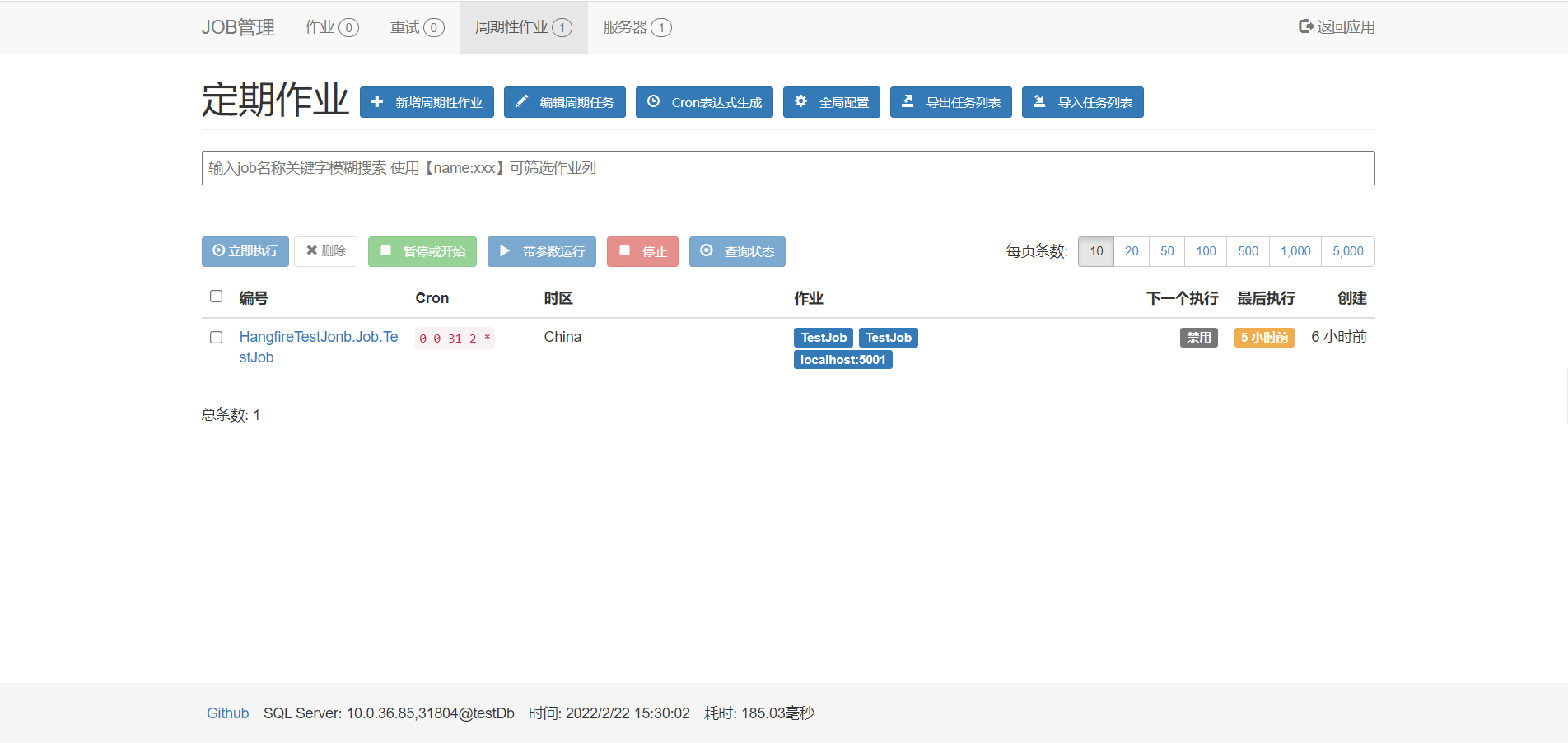
注意
调度服务与执行器都通过
basic认证方式来试下简单的认证。如果添加了认证,需要在配置中指定账号密码,否则会出现 401 响应创建一个单例 Job
作业需要继承
JobAgent类,并重写OnStart方法。 执行器会通过反射的方式自动添加执行列表中。public class TestJob : JobAgent { private readonly ILogger<MailSentSpiltJob> _logger; private readonly IServices _services; public TestJob(ILogger<MailSentSpiltJob> logger, IServices services) { _logger = logger; _services = services; } public override async Task OnStart(JobContext jobContext) { jobContext.Console.WriteLine("TestJob开始"); // 业务逻辑。 } }
注意
单例的执行器使用到的依赖注入服务的生命周期都要使用单例的
AddSingleton。 并且,当前的jobagent的单例模式并不支持水平扩展的服务。 如果你的服务启动了多个实例,那么单例的方法并不起作用,发起调度指令的请求依然会轮训到各个实例并启动。创建一个多例 Job
// 增加特性,标记此作业是一个多实例作业
[TransientJob]
public class TestJob : JobAgent
{
    private readonly ILogger<MailSentSpiltJob> _logger;
    private readonly IServices _services;
    public TestJob(ILogger<MailSentSpiltJob> logger, IServices services)
    {
        _logger = logger;
        _services = services;
    }

    public override async Task OnStart(JobContext jobContext)
    {
        jobContext.Console.WriteLine("TestJob开始");
        // 业务逻辑。
    }
}
注意
在编写执行器时需要注意,执行器实例是在调度指令发起的 http 请求中创建的,所以为了快速的响应调度指令而不造成阻塞,不要在执行器的构造函数中执行耗时的初始化动作。
如何打印日志到调度端可视化界面
public class TestJob : JobAgent
{
    private readonly ILogger<MailSentSpiltJob> _logger;
    private readonly IServices _services;
    public TestJob(ILogger<MailSentSpiltJob> logger, IServices services)
    {
        _logger = logger;
        _services = services;
    }

    public override async Task OnStart(JobContext jobContext)
    {
        // 通过 jobContext.Console 向可视化界面输出日志。
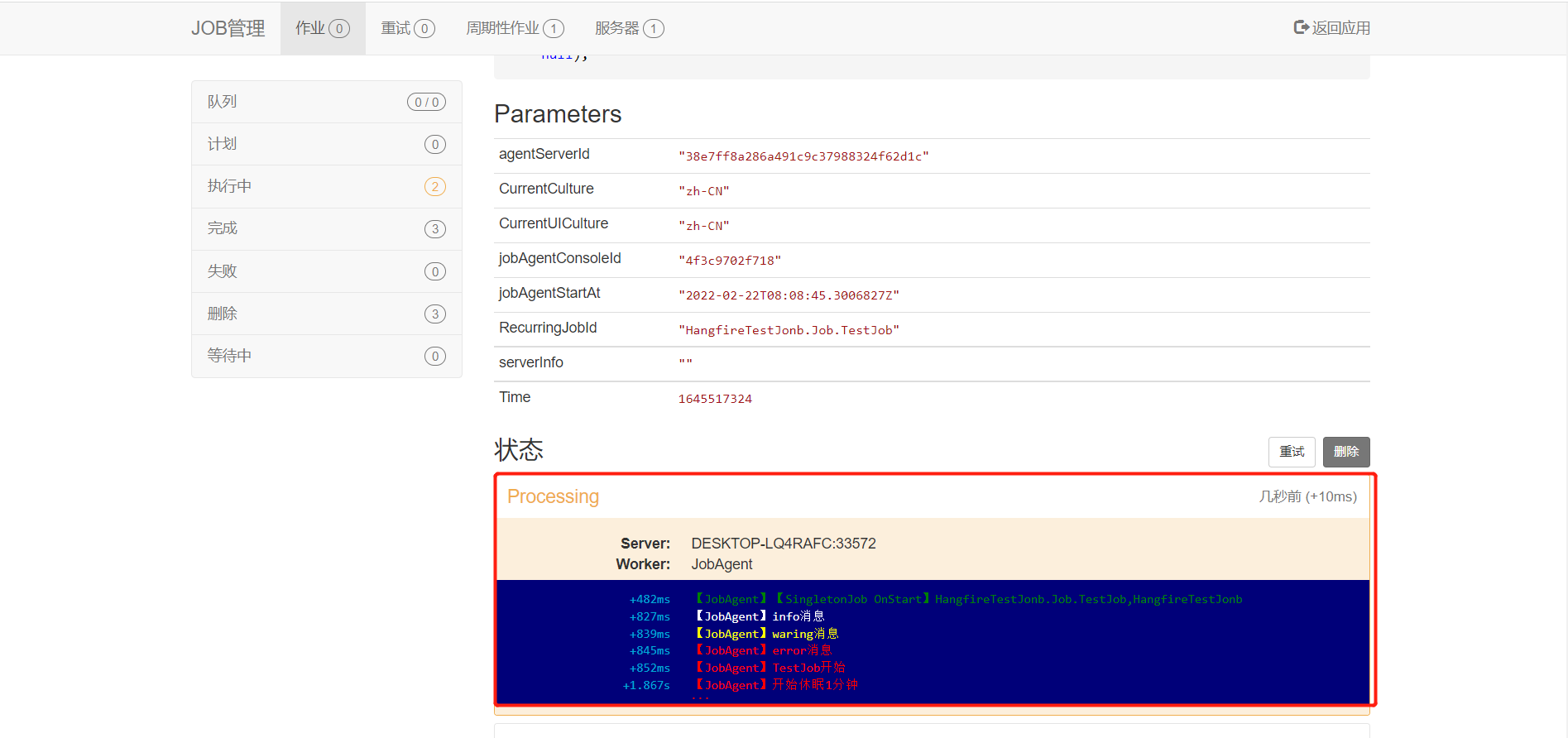
        jobContext.Console.Info(jobContext.JobItem.Data);
        jobContext.Console.Info("info消息");
        jobContext.Console.Warning("waring消息");
        _logger.Info("应用日志的输出。");
    }
}
对应效果如下 详细文档请查看 :
小技巧
最佳实践:一般我们会在可视化页面中输出作业进度信息或关键节点信息,让我们可以方便观察当前作业的执行情况。 而业务逻辑的具体日志则通过
_logger写入文件日志或ELK等日志收集系统。
调度中心的使用(服务端)
将
job注册到调度中心如果执行器开启了自动注册,在执行器启动时会自动在调度中心生成自生的调度参数。或则,就需要手动在可视化页面手动录入。
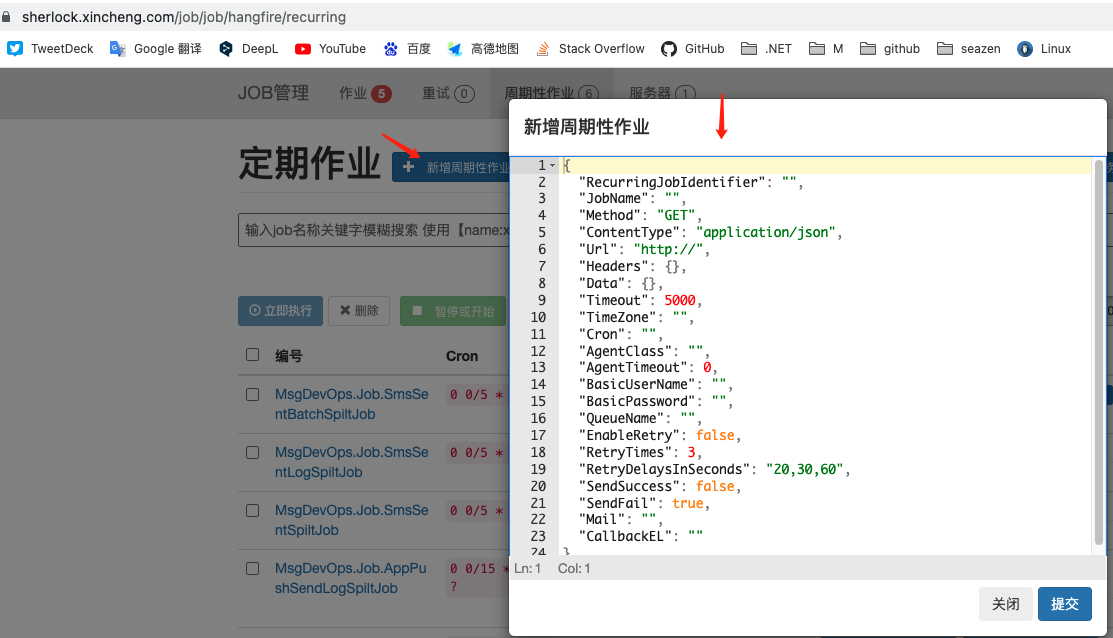
json格式如下:{ "JobName": "TestJob", "Method": "POST", "ContentType": "application/json", "Url": "https://job.demo.com/msgjob/jobagent", "DelayFromMinutes": 1, "Corn": "* 0/5 * * * ?", "Data": { "Hour": 48 }, "Timeout": 5000, "BasicUserName": "jobagent", "BasicPassword": "jobagent", "QueueName": "recurring", "EnableRetry": false, "RetryTimes": 3, "RetryDelaysInSeconds": "5,20,30", "AgentClass": "MsgDevOps.Job.TestJob,MsgDevOps" }
详细字段说明:
字段名称
说明
JobName
Job 名称
Method
http 请求的方法
ContentType
http 参数类型
Url
Agent 的注册地址
DelayFromMinutes
1 代表延迟 1 分钟 填
0代表立即执行Corn
Corn 表达式 (Corn 表达式在线生成) ,每五分钟执行一次,支持到秒级配置
Data
调度时传递给执行器的
json数据Timeout
http 调用超时设置
BasicUserName
Agent 设置的 basicAuth
BasicPassword
Agent 设置的 basicAuth
QueueName
设置你先要在哪个 queue 执行
EnableRetry
失败的时候(比如超时 远程服务器请求错误等)是否启用重试 默认 false
RetryTimes
错误尝试次数自定义,EnableRetry=true 的时候启用
RetryDelaysInSeconds
失败重试区间,半角逗号隔开,EnableRetry=true 的时候启用
AgentClass
作业的完整类名及组件名称,
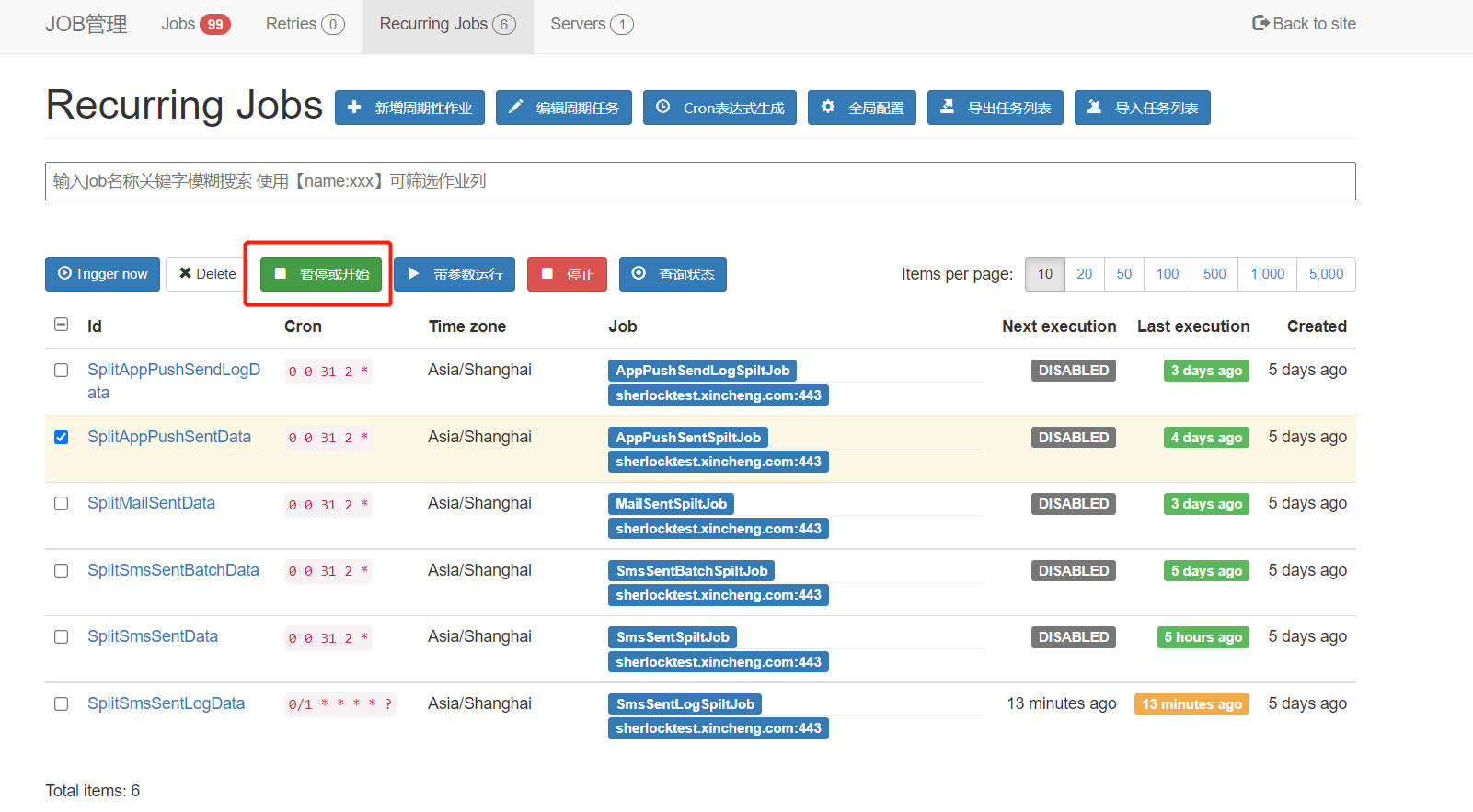
⚠️ 这个只有是 JobAgent 方式对接时才需要填开始和暂停
开始或暂停仅是是否调度的开关,不会影响正在执行的作业。
停止
点击停止按钮,调度中心会向执行器发送
http调度指令,当执行器接收到指令后,会调用Job重载的OnStop方法。(执行中的业务可以在此实现停止逻辑)
但是此停止按钮并不影响调度中心调度此作业。 客户端具体实现如下://如何停止正在执行的job public override async Task OnStart(JobContext jobContext) { jobContext.Console.WriteLine("TestJob开始"); await Task.Delay(1000); // 写自己的逻辑 for (int i = 0; i < 10; i++) { // 判断是否触发了停止按钮,如果触发了,只停止执行逻辑 if (jobContext.CancelToken.IsCancellationRequested) return; jobContext.Console.WriteLine($"开始休眠{i+1}分钟"); await Task.Delay(1000 * 60); } } public override async Task OnStop(JobContext jobContext) { jobContext.Console.WriteLine("触发停止按钮"); //取消 jobContext.CancelToken.Cancel(); await base.OnStop(jobContext); }
重要
Hangfire.HttpJob目前版本的设计与实现,并不支持执行器的横向扩展,它的使用前提都是执行器仅有一个实例的情况下。 此处的停止按钮,当下游执行器多实例部署时,发起的停止http指令,只会被多个执行器实例的一个实例接收到,并在进程内执行停止动作, 其他实例并不受控制。带参数运行
在新增或手动执行
Job时可以在可视化界面上手动录入json的参数。参数会随着http调度执行传递给执行器中的作业。
在Job中可以通过jobContext.JobItem.Data获取到json字符串(作业需要自行反序列化)。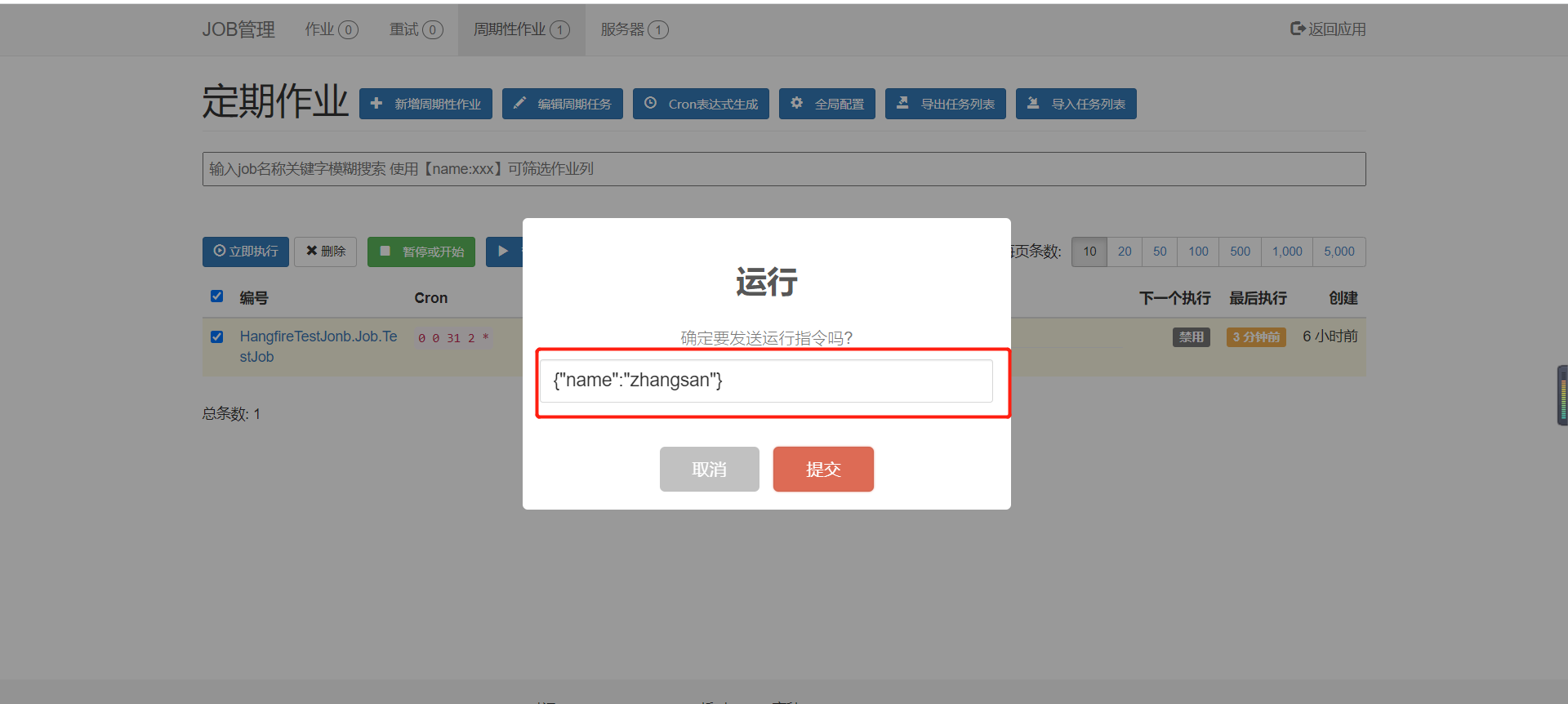
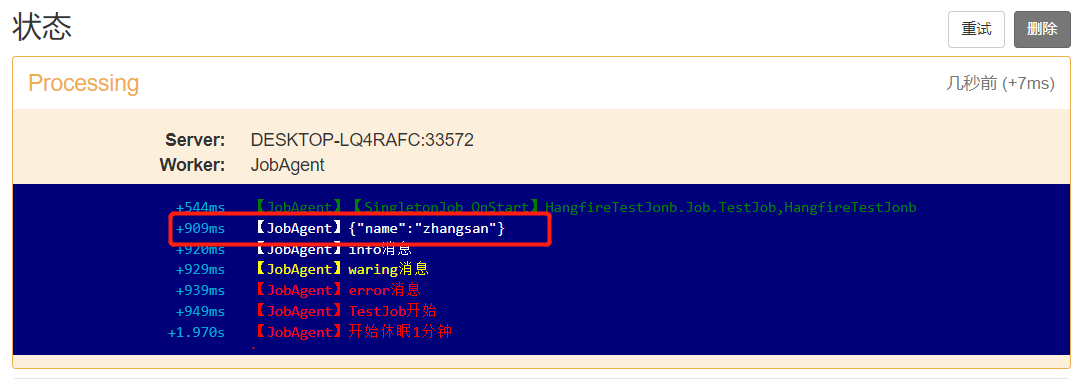
客户端如何接收参数如下:
public override async Task OnStart(JobContext jobContext)
{
    // 接收调度端UI界面输入的参数
    jobContext.Console.Info(jobContext.JobItem.Data);
}
效果如下:
小技巧
如果需要支持到秒级别的调度,需要在调度中心初始化时将 SchedulePollingInterval 属性设置的短一些。
string[] queues = new string[] { "default", "apis", "recurring" };
services.AddHangfireServer(options =>
{
    options.ServerTimeout = TimeSpan.FromMinutes(4);
    options.SchedulePollingInterval = TimeSpan.FromSeconds(1); // 秒级任务需要配置短点,一般任务可以配置默认时间,默认15秒
    options.ShutdownTimeout = TimeSpan.FromMinutes(30); // 超时时间
    options.Queues = queues; // 队列
    options.WorkerCount = Math.Max(Environment.ProcessorCount, 40); // 工作线程数,当前允许的最大线程,默认20
});
典型应用举例
下面我们以工单在关单时需要消除待办为例,讲解一下使用后台作业解耦下游系统依赖。
首先,我们先看下目前,工单的业务代码实现过程。
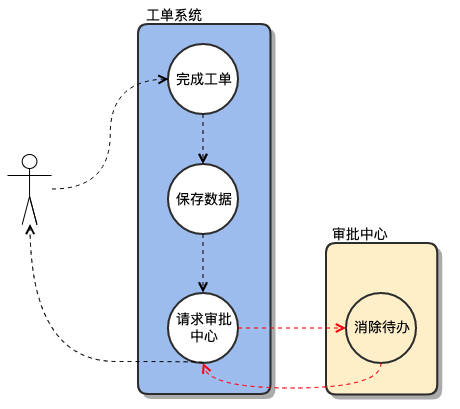
实现的代码:(伪代码)
// WorkOrderController.cs
[HttpPost("{workOrderId}/Completed")]
public Result Completed(string workOrderId, [FromBody] WorkOrderCompleteArg arg)
{
   _workOrderService.Completed(IdentityName, workOrderId, arg);
    return Result.Ok();
}

// WorkOrderService.cs
public void Completed(string loginName, string workOrderId, WorkOrderCompleteArg arg)
{
    // ... 工单的其他业务逻辑
    using (var connection = DapperHelper.GetDbConnection())
    {
        connection.Open();
        using (var transaction = connection.BeginTransaction())
        {
            try
            {
                // 更新工单附件
                _workOrderAttachmentAdapter.UpdateWorkOrderAttachment(attachmentList, connection, transaction);
                // 更新工单表
                _workOrderAdapter.UpdateWorkOrder(workOrderData, connection, transaction);
                // 记录日志
                RecordOperation(...);
                transaction.Commit();
            }
            catch (Exception ex)
            {
                transaction.Rollback();
                throw ex;
            }
        }
    }

    //一键吐槽和bpm通过api创建的工单不发待办
    if (condition)
    {
        // 发送待办
        SendTask(...);
    }
    else if (otherCondition)
    {
        //发送短信
        SendSmsMessage(...);
    }
}
下面是我们使用后台作业解耦后的实现流程
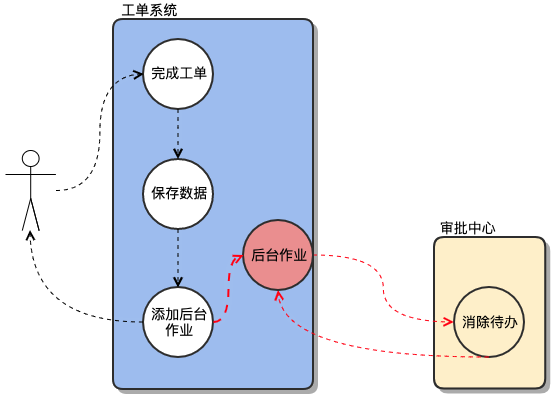
// WorkOrderController.cs
[HttpPost("{workOrderId}/Completed")]
public Result Completed(string workOrderId, [FromBody] WorkOrderCompleteArg arg)
{
   _workOrderService.Completed(IdentityName, workOrderId, arg);
    return Result.Ok();
}

// WorkOrderService.cs
public void Completed(string loginName, string workOrderId, WorkOrderCompleteArg arg)
{
    // ... 工单的其他业务逻辑

    // 为job执行提供参数
    bool condition = true;
    bool otherCondition = true;
    object data = new Object();

    using (var connection = DapperHelper.GetDbConnection())
    {
        connection.Open();
        using (var transaction = connection.BeginTransaction())
        {
            try
            {
                // 更新工单附件
                _workOrderAttachmentAdapter.UpdateWorkOrderAttachment(attachmentList, connection, transaction);
                // 更新工单表
                _workOrderAdapter.UpdateWorkOrder(workOrderData, connection, transaction);
                // 记录日志
                RecordOperation(...);
                BackgroundJob.Enqueue(() => SendMsg(condition,otherCondition,data));
                transaction.Commit();
            }
            catch (Exception ex)
            {
                transaction.Rollback();
                throw ex;
            }
        }
    }
}

public void SendMsg(bool condition ,bool otherCondition,Object data)
{
    //一键吐槽和bpm通过api创建的工单不发待办
    if (condition)
    {
        // 发送待办
        SendTask(...);
    }
    else if (otherCondition)
    {
        //发送短信
        SendSmsMessage(...);
    }
}
备注
我们将发送待办或者短信单独封装方法,并在关单业务的主流程中把它添加到后台作业中。
BackgroundJob.Enqueue(() => SendMsg(condition,otherCondition,data));
这样,发送消息的业务代码就和主干解耦,并由后台作业框架驱动执行。