应用日志及告警
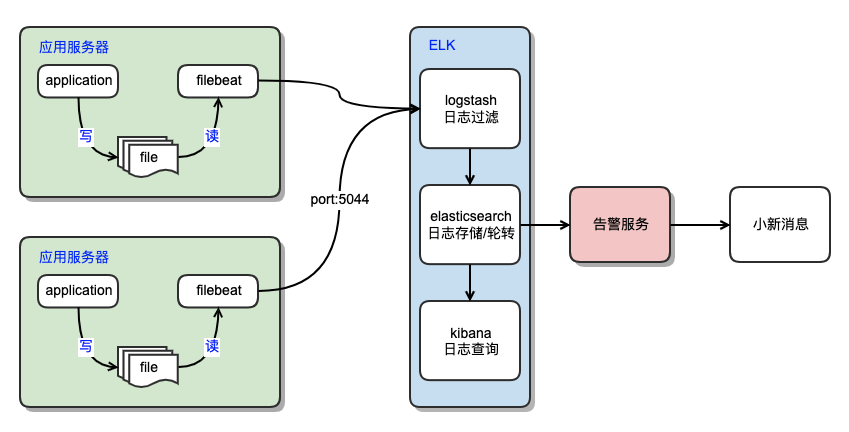
我们的应用日志系统基于 ELK 实现,并通过自研告警服务,将严重的系统错误推送到消息服务中。
架构
应用通过使用开源的日志组件将日志以文件形式滚动输出到磁盘。
再通过安装 filebeat 后,统一对接集成平台 ELK 日志系统并最终在 kibana 中准实时查看应用系统线上日志。
统一应用日志格式
注意
以下文档仅展示 dotnet8 下的最佳实践,通过 serilog 组件直接输出到 logstash。
通常情况下,API服务都部署在统一的网关服务后,限流、鉴权、HTTP 请求日志等通用类功能由网关完成,API服务本身仅需要关注自身的应用日志。 但在单机部署的 dotnet8 程序,应用日志和 HTTP 请求日志就都需要应用本身实现。从 .net 6 开始,微软官方在框架中增加了 HTTP logging 的功能。这极大的方便了应用记录请求日志的方式。
当在 net8 + k8s 的环境下我们推荐使用 serilog 作为日志输出组件,并直接输出 json 格式的日志到控制台。
这种格式的数据,方便在容器环境下通过 host 宿主统一收集,并且减少了 logstash 分割、解析、转换日志的工作量。
重要
另外,serilog 日志组件的优势在于提供了很多开源传输层,可以将日志写到各种持久化存储中。
如:AmazonS3、AMQP、Skywalking、Elasticsearch、File、Http 详细列表
当日志大量直接发送到 logstash 后可能会导致 logstash 压力过大 OOM 重启。
此时可以结合开源传输层将日志先发送到 MQ 中,再由 logstash 消费日志解决此问题。
下面展示集成 serilog 的日志格式内容:(一行一json)
// 应用日志
{"@time":"2024-03-18T08:52:10.3173240Z","@msg":"Now listening on:\"http://localhost:5124\"","@eventId":"d826f4b8","@level":"Information","@logger":"Microsoft.Hosting.Lifetime","@threadId":1,"@host":"MacBook Pro"}
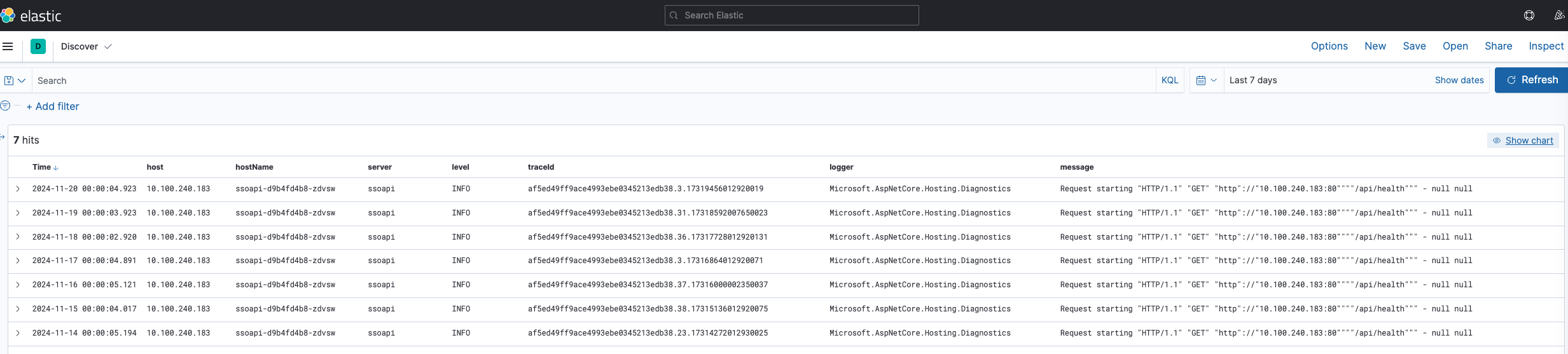
应用日志在 kibana 中展示如下:
// http 请求日志
{ "Time": "2024-03-18T09:27:19.2619120Z", "EventId": "8b8e65b7", "TraceId": "a75bc46a90002ffbe4c2cc09cc4e7d67", "SpanId": "e8564c9168036767", "Protocol": "HTTP/1.1", "Method": "POST", "Scheme": "http", "PathBase": "", "Path": "/post", "Accept": "*/*", "Connection": "close", "Host": "host:5124", "User-Agent": "curl/8.4.0", "Content-Type": "application/json; charset=utf-8", "Content-Length": "14", "StatusCode": 200, "RequestBody": "{\"name\":\"aaa\"}", "RequestBodyStatus": "[Completed]", "ResponseBody": "[{\"date\":\"2024-03-19\"}]", "Duration": 105.2315, "RequestId": "0HN275MDR5DKJ:00000001", "RequestPath": "/post", "ConnectionId": "0HN275MDR5DKJ", "ThreadId": 6, "MachineName": "MacBook Pro" }
Serilog 集成示例
在集成 serilog 时,由于开源版本的 json 日志 Formatter 不能满足我们的日志格式要求。所以我们需要重写应用日志,及http请求日志的 Formatter。以便于我们统一输出的 json 字段格式。
统一字段是为了方便在 elasticsearch 等存储中配置索引字段
# 添加包引用
dotnet add package Serilog.AspNetCore
dotnet add package Serilog.Enrichers.Environment
dotnet add package Serilog.Enrichers.Thread
http 请求日志 formatter
public class HttpLogJsonFormatter : ITextFormatter
{
    private readonly JsonValueFormatter _valueFormatter;

    public HttpLogJsonFormatter(JsonValueFormatter valueFormatter = null)
    {
        _valueFormatter = valueFormatter ?? new JsonValueFormatter("$type");
    }

    public void Format(LogEvent logEvent, TextWriter output)
    {
        FormatEvent(logEvent, output, _valueFormatter);
        output.WriteLine();
    }

    public static void FormatEvent(LogEvent logEvent, TextWriter output, JsonValueFormatter valueFormatter)
    {
        if (logEvent == null)
        {
            throw new ArgumentNullException("logEvent");
        }

        if (output == null)
        {
            throw new ArgumentNullException("output");
        }

        if (valueFormatter == null)
        {
            throw new ArgumentNullException("valueFormatter");
        }

        output.Write("{\"Time\":\"");
        output.Write(logEvent.Timestamp.UtcDateTime.ToString("O"));
        output.Write("\",\"EventId\":\"");
        output.Write(EventIdHash.Compute(logEvent.MessageTemplate.Text).ToString("x8", CultureInfo.InvariantCulture));
        output.Write('"');

        if (logEvent.Exception != null)
        {
            output.Write(",\"Error\":");
            JsonValueFormatter.WriteQuotedJsonString(logEvent.Exception.ToString(), output);
        }

        if (logEvent.TraceId.HasValue)
        {
            output.Write(",\"TraceId\":\"");
            output.Write(logEvent.TraceId.Value.ToHexString());
            output.Write('"');
        }

        if (logEvent.SpanId.HasValue)
        {
            output.Write(",\"SpanId\":\"");
            output.Write(logEvent.SpanId.Value.ToHexString());
            output.Write('"');
        }

        logEvent.RemovePropertyIfPresent("HttpLog");
        logEvent.RemovePropertyIfPresent("SourceContext");
        logEvent.RemovePropertyIfPresent("EventId");

        foreach (KeyValuePair<string, LogEventPropertyValue> property in logEvent.Properties)
        {
            string text = property.Key;
            if (text.Length > 0 && text[0] == '@')
            {
                text = "@" + text;
            }

            output.Write(',');
            JsonValueFormatter.WriteQuotedJsonString(text, output);
            output.Write(':');
            valueFormatter.Format(property.Value, output);
        }

        output.Write('}');
    }
}
应用日志 formatter
public class APPLogJsonFormatter : ITextFormatter
{
    private readonly JsonValueFormatter _valueFormatter;

    public APPLogJsonFormatter(JsonValueFormatter valueFormatter = null)
    {
        _valueFormatter = valueFormatter ?? new JsonValueFormatter("$type");
    }

    public void Format(LogEvent logEvent, TextWriter output)
    {
        FormatEvent(logEvent, output, _valueFormatter);
        output.WriteLine();
    }

    public static void FormatEvent(LogEvent logEvent, TextWriter output, JsonValueFormatter valueFormatter)
    {
        if (logEvent == null)
        {
            throw new ArgumentNullException("logEvent");
        }

        if (output == null)
        {
            throw new ArgumentNullException("output");
        }

        if (valueFormatter == null)
        {
            throw new ArgumentNullException("valueFormatter");
        }

        output.Write("{\"@time\":\"");
        output.Write(logEvent.Timestamp.UtcDateTime.ToString("O"));
        output.Write("\",\"@msg\":");
        JsonValueFormatter.WriteQuotedJsonString(logEvent.MessageTemplate.Render(logEvent.Properties, CultureInfo.InvariantCulture), output);
        output.Write(",\"@eventId\":\"");
        output.Write(EventIdHash.Compute(logEvent.MessageTemplate.Text).ToString("x8", CultureInfo.InvariantCulture));
        output.Write('"');

        // level
        output.Write(",\"@level\":\"");
        output.Write(logEvent.Level);
        output.Write('"');

        if (logEvent.Exception != null)
        {
            output.Write(",\"@error\":");
            JsonValueFormatter.WriteQuotedJsonString(logEvent.Exception.ToString(), output);
        }

        if (logEvent.TraceId.HasValue)
        {
            output.Write(",\"@traceId\":\"");
            output.Write(logEvent.TraceId.Value.ToHexString());
            output.Write('"');
        }

        if (logEvent.SpanId.HasValue)
        {
            output.Write(",\"@spanId\":\"");
            output.Write(logEvent.SpanId.Value.ToHexString());
            output.Write('"');
        }

        if (logEvent.Properties.ContainsKey("SourceContext"))
        {
            output.Write(",\"@logger\":");
            valueFormatter.Format(logEvent.Properties["SourceContext"], output);
        }

        if (logEvent.Properties.ContainsKey("ThreadId"))
        {
            output.Write(",\"@threadId\":");
            valueFormatter.Format(logEvent.Properties["ThreadId"], output);
        }

        if (logEvent.Properties.ContainsKey("MachineName"))
        {
            output.Write(",\"@host\":");
            valueFormatter.Format(logEvent.Properties["MachineName"], output);
        }

        output.Write('}');
    }
}
public class Program
{
    public static void Main(string[] args)
    {
        // 两段初始化,这里的 logger 不受 appsettings.json 的影响
        Log.Logger = new LoggerConfiguration()
            .WriteTo.Console(new APPLogJsonFormatter())
            .CreateBootstrapLogger();

        try
        {
            Log.Information("Starting web application");
            Run(args);
        }
        catch (Exception ex)
        {
            Log.Fatal(ex, "Application terminated unexpectedly");
        }
        finally
        {
            Log.CloseAndFlush();
        }
    }

    static void Run(string[] args)
    {
        var builder = WebApplication.CreateBuilder(args);

        builder.AddSerilog();
        ...
        var app = builder.Build();

        app.UseSerilog();

        app.Run();
    }
}

static class StartupHelper
{
    public static void AddSerilog(this WebApplicationBuilder builder, bool httpLogging = true)
    {
        // 匹配 HttpLoggingMiddleware 用于将请求日志输出到特殊索引中。
        Func<Serilog.Events.LogEvent, bool> httpLoggerFilter = Matching.FromSource("Microsoft.AspNetCore.HttpLogging.HttpLoggingMiddleware");

        // 清空默认日志 providers
        builder.Logging.ClearProviders();

        builder.Host.UseSerilog(
            (context, services, configuration) =>
                configuration
                .ReadFrom.Configuration(context.Configuration)
                .ReadFrom.Services(services)
                .Enrich.FromLogContext()
                .Enrich.WithThreadId()
                .Enrich.WithMachineName()
                // 配置不同的日志,写到不认同的持久化层。这里都写到了 console
                .WriteTo.Logger(httpLogging ?
                    config => config
                                .Filter.ByIncludingOnly(httpLoggerFilter)
                                .WriteTo.Console(new HttpLogJsonFormatter())
                    : config => { })
                .WriteTo.Logger(
                    config => config
                                .Filter.ByExcluding(httpLoggerFilter)
                                .WriteTo.Console(new APPLogJsonFormatter())
                )
        );

        // 配置 http 请求,详情参见 https://learn.microsoft.com/en-us/aspnet/core/fundamentals/http-logging/?view=aspnetcore-8.0
        if (httpLogging)
        {
            builder.Services.AddHttpLogging(opt =>
            {
                opt.LoggingFields = HttpLoggingFields.All;
                opt.RequestHeaders.UnionWith(["Authorization", "Cookie", "Origin", "Referer"]);
                opt.MediaTypeOptions.Clear();
                opt.MediaTypeOptions.AddText("application/json");
                opt.MediaTypeOptions.AddText("text/plain");
                opt.RequestBodyLogLimit = 4096;
                opt.ResponseBodyLogLimit = 4096;
                opt.CombineLogs = true;
            });
        }
    }

    public static void UseSerilog(this WebApplication app, bool httpLogging = true)
    {
        if (httpLogging)
        {
            app.UseHttpLogging();
        }
    }
}
重要
出于目前业界已转向 OpenTelemetry 来一并解决 metrics(指标), logs(日志) 和 traces (链路)收集的问题。我们也在逐步迁移至 OpenTelemetry。
后续新版本的中我们的日志收集将抛弃 ELk 架构。采用 OpenTelemetry .NET Client 来完成日志的采集。