应用健康检查
一般我们应用程序的运行需要依赖大量的基础组件和开源中间件。如数据库、消息队列、缓存等等。
这些基础组件的健康状态会直接影响到我们的应用程序的正常运行情况。所以本章节。我们来讨论如何对这些基础组件的健康状态进行监控。
在 dotnet core 3.1 中,微软增加了 health checks 的相关能力用来监控应用的健康状态。我们可以通过配置文件或者代码的方式来配置 health checks。详情请参考 Health checks in ASP.NET Core。
另外,在 github 上有一个开源项目,实现了大部分主流中间件的 health checks,可以直接使用。AspNetCore.Diagnostics.HealthChecks 这极大的简化了我们对应用程序依赖的如数据库,mq等基础组件的健康探测和预警。
架构及原理
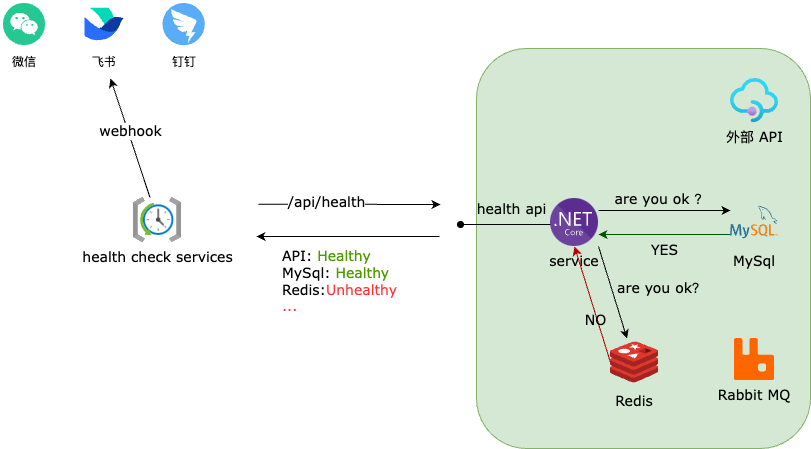
各服务按照自己的依赖组件,配置好 health checks 并提供一个 api,然后由统一的 check 服务,通过定时轮询各服务的 health checks api 的方式获取各服务的健康状态。最终,再通过 webhook 接口将异常状态推送到外部消息服务。
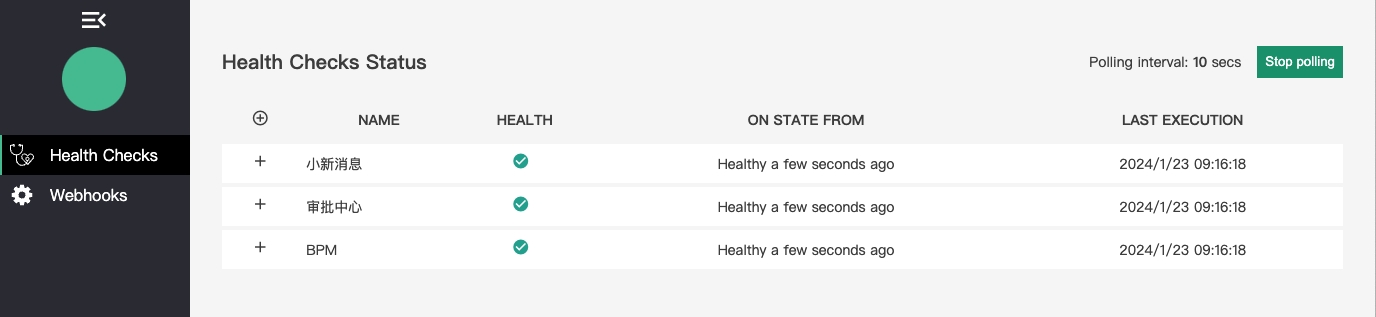
另外,Health Check 服务还提供了一个简单的 UI 来查看各服务的监控状态。
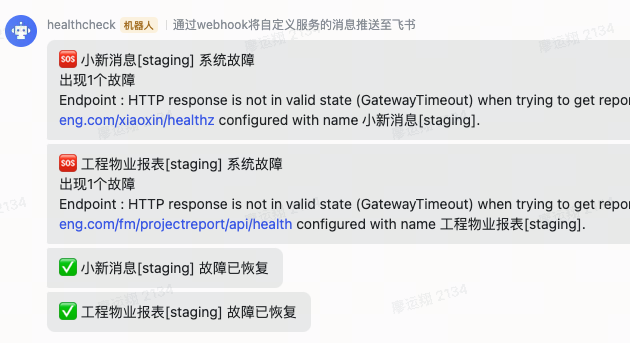
webhook 提供了推送各IM消息接口
应用如何集成 Health Checks?
# 根据应用需要,添加需要的包
dotnet add package AspNetCore.HealthChecks.SqlServer
dotnet add package AspNetCore.HealthChecks.MongoDb
dotnet add package AspNetCore.HealthChecks.Hangfire
// 请注意,这是一个简单的示例代码。具体的配置,请参考微软的官方文档。
public class Startup
{
    public void ConfigureServices(IServiceCollection services)
    {
        string conn = configuration.GetConnectionString("SqlConnection");

        // 增加 sqlserver 检查
        services
        .AddHealthChecks()
        .AddSqlServer(conn);
    }

    public void Configure(IApplicationBuilder app, IWebHostEnvironment env)
    {
        app.UseEndpoints(endpoints =>
        {
            // 注册供 Health Check 服务调用的接口
            endpoints.MapHealthChecks(
                "/api/hz",
                new HealthCheckOptions()
                {
                    ResponseWriter = UIResponseWriter.WriteHealthCheckUIResponse
                }
            );
            endpoints.MapControllers();
        });
    }
}
经过以上步骤,应用将会在 /api/hz 接口,返回下面数据格式的 json 数据
{
    "status": "Healthy",
    "totalDuration": "00:00:00.0000001",
    "results": {
        "sqlserver": {
            "status": "Healthy",
            "description": "SQL Server connection health check",
            "data": {
                "ConnectionState": 1,
                "Duration": "00:00:00.0000001"
            }
        }
    }
}
如何增加自定义 Health Checks?
public class MQCountHealthCheck : IHealthCheck
{
    public Task<HealthCheckResult> CheckHealthAsync(
        HealthCheckContext context, CancellationToken cancellationToken = default)
    {
        // 检查消息队列中的消息数量
        var cnt = 0;
        if (cnt < 1000)
        {
            return Task.FromResult(HealthCheckResult.Healthy("A healthy result."));
        }

        return Task.FromResult(new HealthCheckResult(context.Registration.FailureStatus, $"too many mq !! current count:{cnt}"));
    }
}
// 注册自定义的 Health Check
builder.Services.AddHealthChecks()
    .AddCheck<MQCountHealthCheck>("mq_count_hz");
如何搭建 Health Check 服务?
小技巧
目前,我们将 health check 服务集成在了我们的告警服务中。
# 项目添加依赖包
dotnet add package AspNetCore.HealthChecks.UI
dotnet add package AspNetCore.HealthChecks.UI.Core
dotnet add package AspNetCore.HealthChecks.UI.Client
dotnet add package AspNetCore.HealthChecks.UI.InMemory.Storage
// 请注意,这是一个简单的示例代码。具体的配置,请参考微软的官方文档。
public class Startup
{
    public void ConfigureServices(IServiceCollection services)
    {
        string webHookUri = configuration["FeiShu:HealthCheckWebHook"];

        services
        .AddHealthChecksUI(setup =>
        {
            setup.MaximumHistoryEntriesPerEndpoint(5);
            setup.AddHealthCheckEndpoint("消息服务", "https://msg.demo.com/api/hz");
            setup.AddHealthCheckEndpoint("审批中心", "https://bpm.demo.com/api/hz");

            // 开启飞书 webhook 推送
            if (!string.IsNullOrEmpty(webHookUri))
            {
                setup.AddWebhookNotification(
                        name: "feishu",
                        uri: webHookUri,
                        // 系统故障发送内容
                        payload: "{\"msg_type\": \"text\", \"content\": {\"text\": \"🆘 系统故障 [[DESCRIPTIONS]]\"}}",
                        // 故障恢复内容
                        restorePayload: "{ \"msg_type\": \"text\", \"content\": { \"text\": \"✅ 故障已恢复\" } }",
                        shouldNotifyFunc: (livenessName, report) => true,
                        // [[FAILURE]] 占位符
                        customMessageFunc: (livenessName, report) =>
                        {
                            var failing = report.Entries.Where(e => e.Value.Status == UIHealthStatus.Unhealthy);
                            return $"{failing.Count()} 个故障";
                        },
                        // [[DESCRIPTIONS]] 占位符
                        customDescriptionFunc: (livenessName, report) =>
                        {
                            var failing = report.Entries.Where(e => e.Value.Status == UIHealthStatus.Unhealthy);
                            var msgs = failing.Select(f => $"{f.Key}:{f.Value.Exception}");
                            return string.Join("\n", msgs);
                        }
                    );
            }
        })
        .AddInMemoryStorage();
    }

    public void Configure(IApplicationBuilder app, IWebHostEnvironment env)
    {
        app.UseEndpoints(endpoints =>
        {
            // 使用 /hz-ui 打开监控页面
            endpoints.MapHealthChecksUI(options => { options.UIPath = "/hz-ui"; });
            endpoints.MapControllers();
        });
    }
}