搜索引擎(ElasticSearch)
应用场景
全文搜索
聚合搜索
关键字高亮
拼音检索
集群及配置
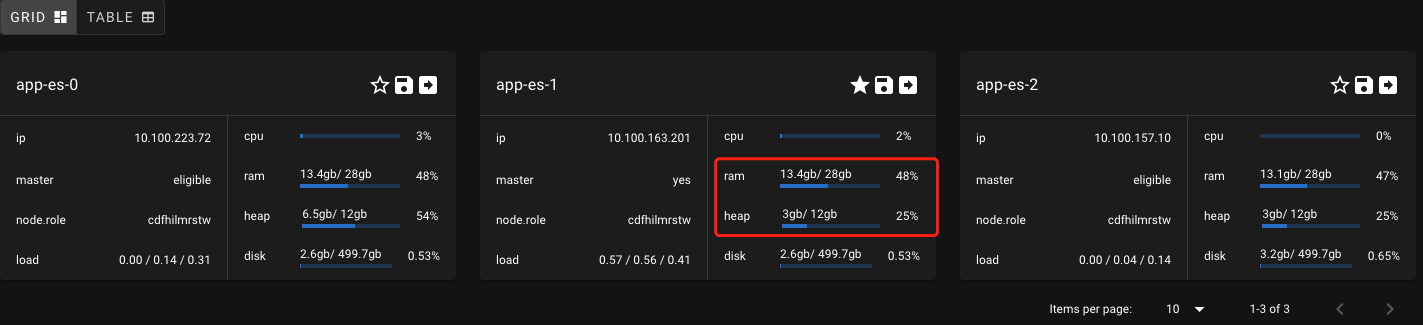
使用内存 16G 及以上的机器,并把机器的一半内存给堆内存。
把机器一半的内存留给非堆内存,让 lucene 使用这些非堆内存来缓存更多的索引文件。
JVM 内存不要超过 32G。
关闭 linux 的 swap。
尽量使用 ssd 作为存储。
工具 (Kibana & Elasticvue)
Kibana 一般用于 ELK 架构的日志查询和简单的索引管理功能,较偏向于运维人员。
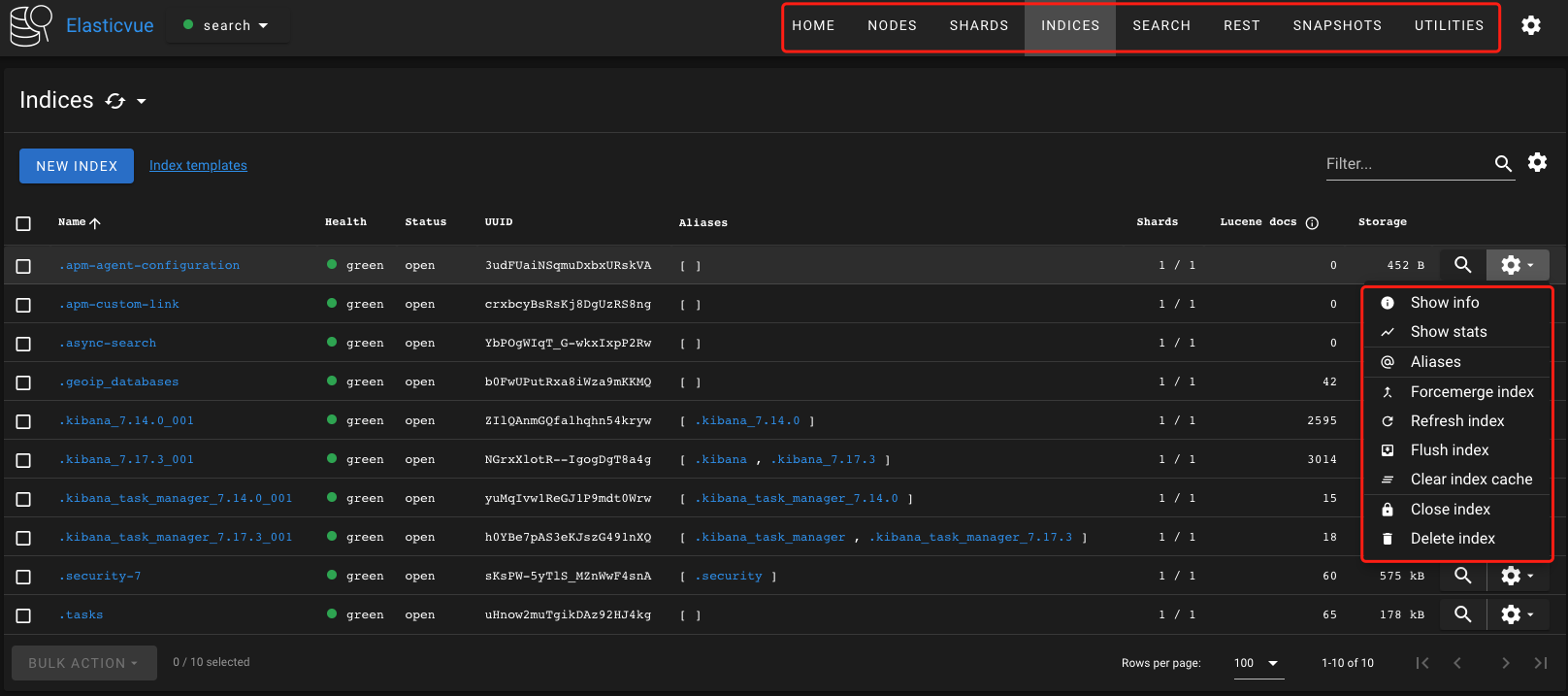
Elasticvue 提供了更多原始的 ES API 能里,更偏开发人员使用。
创建索引 & Mapping & 分片 & 路由 & 搜索
connecting,连接到 es 服务
# 添加包引用,主版本需要和安装的 es 主版本一致。
dotnet add package NEST --version '7.17.5'
// 创建 es client ,推荐使用单例模式
var conn = new Uri("http://example.com:9200");
var settings = new ConnectionSettings(conn);
var client = new ElasticClient(settings);
mapping, 定义数据结构及对应的 es 数据类型。
keyword: 用于全字匹配、左匹配或者通配符匹配。类似于 sql 中的=like 'A%'like '%A%'text: 用于全文搜索,需要设置对应的分词器。结果一般需要按照匹配度排序和高亮显示匹配文字。
 1// 指定索引数据的唯一 id。数据会填充到 _id 字段。
 2[ElasticsearchType(IdProperty = nameof(Id))]
 3public class User
 4{
 5    [Keyword(Name = "id")]
 6    public string Id { get; set; }
 7    [Keyword(Name = "code")]
 8    public string Code { get; set; }
 9    [Text(Name = "account_name")]
10    public string AccountName { get; set; }
11    [Text(Name = "name")]
12    public string Name { get; set; }
13    [Keyword(Name = "gender")]
14    public string Gender { get; set; }
15    [Keyword(Name = "age")]
16    public int Age { get; set; }
17}
 1// 创建索引
 2public const string IndexAlias = "user";
 3public static void CreateIndex(IElasticClient client)
 4{
 5    var date = DateTime.Now.ToString("yyyyMMdd");
 6    var indexName = $"{IndexAlias}-{date}";
 7    var response = client.Indices.Create(indexName, c => c
 8        .Settings(s => s
 9            .NumberOfShards(3)
10            .NumberOfReplicas(1)
11        )
12        .Aliases(ad => ad.Alias(IndexAlias))
13        .Map<User>(d => d.AutoMap())
14    );
15}
{
  "user-20230529": {
    "aliases": {
      "user": {}
    },
    "mappings": {
      "properties": {
        "account_name": {
          "type": "text"
        },
        "age": {
          "type": "keyword"
        },
        "code": {
          "type": "keyword"
        },
        "gender": {
          "type": "keyword"
        },
        "id": {
          "type": "keyword"
        },
        "name": {
          "type": "text"
        }
      }
    },
    "settings": {
      "index": {
        "routing": {
          "allocation": {
            "include": {
              "_tier_preference": "data_content"
            }
          }
        },
        "number_of_shards": "3",
        "number_of_replicas": "1",
        "provided_name": "user-20230529",
        "creation_date": "1685346603233",
        "uuid": "YzLTo-14TY2IAS3YV_KaAg",
        "version": {
          "created": "7170399"
        }
      }
    }
  }
}
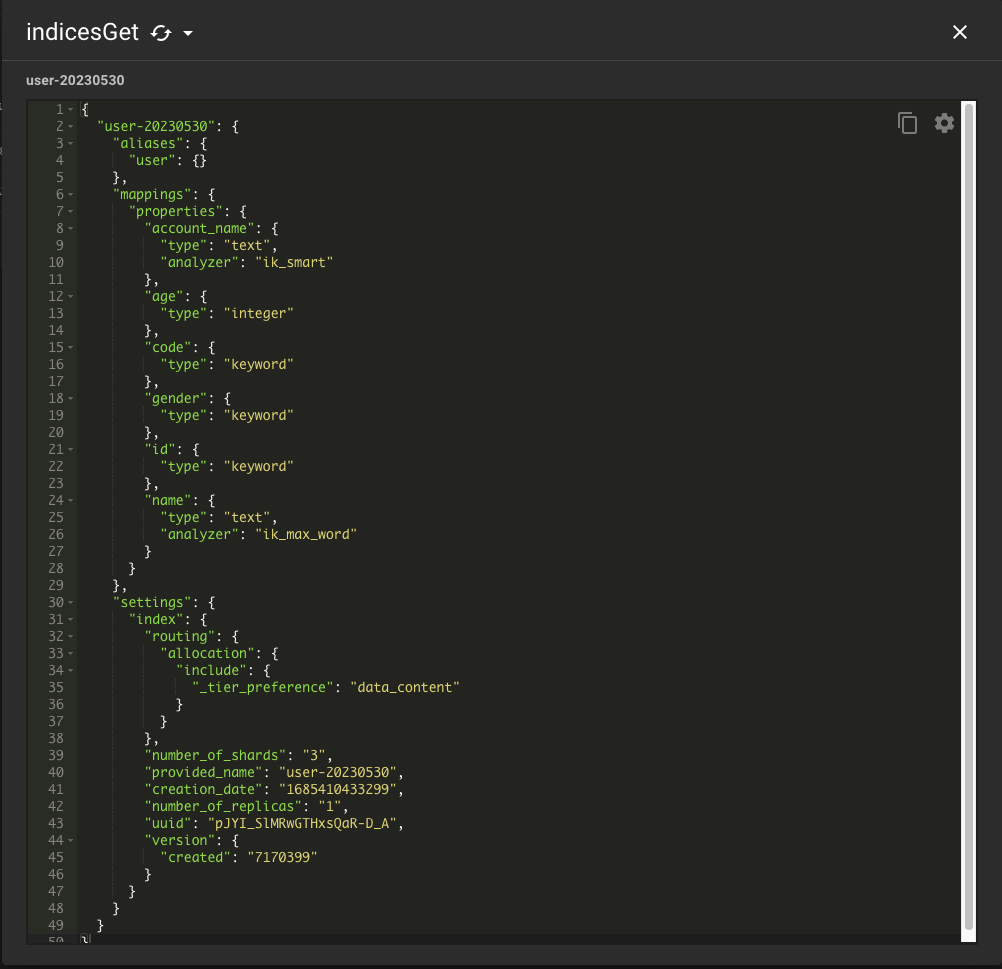
子字段:
 1var response = client.Indices.Create(index, c => c
 2    .Settings(s => s
 3        .NumberOfShards(3)
 4        .NumberOfReplicas(1)
 5    )
 6    .Aliases(ad => ad.Alias(IndexAlias))
 7    .Map<User>(
 8        d => d
 9            .Properties<User>(
10                p => p
11                .Text(
12                    t => t
13                    .Name(u => u.Name)
14                    .Fields(
15                        fs => fs.Keyword(
16                            kw => kw.Name("keyword")
17                            )
18                        )
19                )
20            )
21            .AutoMap()
22    )
23);
{
  "mappings": {
    "properties": {
      "account_name": {
        "type": "text",
        "analyzer": "ik_smart"
      },
      "age": {
        "type": "integer"
      },
      "code": {
        "type": "keyword"
      },
      "gender": {
        "type": "keyword"
      },
      "id": {
        "type": "keyword"
      },
      "name": {
        "type": "text",
        "fields": {
          "keyword": {
            "type": "keyword"
          }
        }
      }
    }
  }
}
indexing 索引文档
public static void FillData(IElasticClient client, IEnumerable<User> users)
{
    var index = GetIndex();

    var bulkAllObservable = client.BulkAll(users, bulkDesc => bulkDesc
        .Index(index)
        .BufferToBulk(
            (bufDesc, buffer)
                => bufDesc.IndexMany(
                    buffer,
                    (desc, user) => desc.Routing(user.Code)
                )
        )
        .BackOffTime("30s")
        .BackOffRetries(1)
        .RefreshOnCompleted()
        .MaxDegreeOfParallelism(Environment.ProcessorCount)
        .Size(1000)
    )
    .Wait(TimeSpan.FromMinutes(15), next =>
    {
        System.Console.WriteLine($"indexed {next.Page * 1000} with {next.Retries} retries");
    });
}
searching 搜索
// keyword 搜索
public static void SearchByUserCodeWithTerm(IElasticClient client, string code)
{
    var index = GetIndex();
    var response = client.Search<User>(s => s
        .Index(index)
        .Query(q => q
            // 完全匹配 mysql 中的 =
            .Term(t => t.Field(f => f.Code).Value(code))
            // 前缀匹配 mysql 中的 like 'XC%'
            .Prefix(t => t.Field(f => f.Code).Value(code))
            // 模糊匹配 中的 like '%010%'
            .Wildcard(t => t.Field(f => f.Code).Value(code))
        )
    );

    foreach (var hit in response.Hits)
    {
        Console.WriteLine($"code :{hit.Source.Code}, account: {hit.Source.AccountName}, name: {hit.Source.Name}, age: {hit.Source.Age}, gender: {hit.Source.Gender}, score:{hit.Score}");
    }
}


// text 搜索
public static void SearchByAccountNameWithMatch(IElasticClient client, string accountName)
{
    var index = GetIndex();
    var response = client.Search<User>(s => s
        .Index(index)
        .Query(q => q
            // 全文匹配
            .Match(m => m.Field(f => f.AccountName).Query(accountName).MinimumShouldMatch(75))
            // 短语匹配
            .MatchPhrase(m => m.Field(f => f.Name).Query(name))
            // 短语前缀匹配
            .MatchPhrasePrefix(m => m.Field(f => f.Name).Query(name))
        )
        .From(0)
        .Size(10)
        .Sort(sort => sort.Descending(SortSpecialField.Score))
    );

    foreach (var hit in response.Hits)
    {
        Console.WriteLine($"code :{hit.Source.Code}, account: {hit.Source.AccountName}, name: {hit.Source.Name}, age: {hit.Source.Age}, gender: {hit.Source.Gender}, score:{hit.Score}");
    }
}

// range 搜索
public static void SearchByAgeWithRange(IElasticClient client, int min, int max, string gender = "男")
{
    var index = GetIndex();
    var response = client.Search<User>(s => s
        .Index(index)
        .Query(q => q
            .Bool(b => b
                .Must(mu => mu.Term(t => t.Field(f => f.Gender).Value(gender)))
                .Filter(
                    f => f.Range(r => r
                        .Field(f => f.Age)
                        .GreaterThanOrEquals(min)
                        .LessThanOrEquals(max))
                )
            )
        )
        .Sort(s => s.Ascending(a => a.Age))
        .From(0)
        .Size(10)
    );

    foreach (var hit in response.Hits)
    {
        Console.WriteLine($"code :{hit.Source.Code}, account: {hit.Source.AccountName}, name: {hit.Source.Name}, age: {hit.Source.Age}, gender: {hit.Source.Gender}, score:{hit.Score}");
    }
}
routing 路由
默认情况下,ES 会根据 _id 字段和分片数来执行分片算法:
shard = hash(routing) % number_of_primary_shards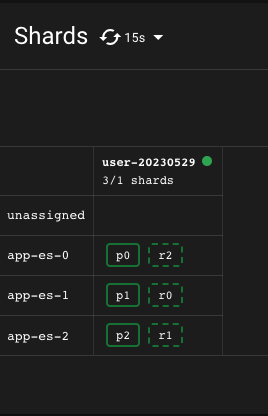
 1// 在添加索引时指定路由
 2var bulkAllObservable = client.BulkAll(users, bulkDesc => bulkDesc
 3    .Index(index)
 4    .BufferToBulk(
 5        (bufDesc, buffer)
 6            => bufDesc.IndexMany(
 7                buffer,
 8                (desc, user) => desc.Routing(user.Code)
 9            )
10    )
11    .BackOffTime("30s")
12    .BackOffRetries(1)
13    .RefreshOnCompleted()
14    .MaxDegreeOfParallelism(Environment.ProcessorCount)
15    .Size(1000)
16)
 1{
 2"_index": "user-20230530",
 3"_type": "_doc",
 4"_id": "77ff5d78bfd311eb9f3f993c053ef3ae",
 5"_version": 1,
 6"_seq_no": 33526,
 7"_primary_term": 1,
 8"_routing": "XC0164433",
 9"found": true,
10"_source": {
11    "id": "77ff5d78bfd311eb9f3f993c053ef3ae",
12    "code": "XC0164433",
13    "account_name": "xuwenqian",
14    "name": "徐文骞",
15    "gender": "男",
16    "age": 35
17}
18}
 1// 搜索时直接指定路由,减少ES查询分片
 2public static void SearchByUserCodeWithTerm(IElasticClient client, string code)
 3{
 4    var index = GetIndex();
 5    var response = client.Search<User>(s => s
 6        .Index(index)
 7        .Routing(code)
 8        .Query(q => q
 9            .Term(t => t.Field(f => f.Code).Value(code))
10        )
11    );
12
13    foreach (var hit in response.Hits)
14    {
15        Console.WriteLine($"code :{hit.Source.Code}, account: {hit.Source.AccountName}, name: {hit.Source.Name}, age: {hit.Source.Age}, gender: {hit.Source.Gender}, score:{hit.Score}");
16    }
17}
索引别名 & 零停机更新索引
别名是给索引添加一个额外的名称,在查询时,我们可以使用别名查询,这样可以做到将真实索引隐藏起来,方便后续的索引迁移、重建等操作。
分词器
# 查看已经安装的插件列表
bin/elasticsearch-plugin list
[ElasticsearchType(IdProperty = nameof(Id))]
public class User
{
    // ...
    [Text(Name = "account_name", Analyzer = "ik_smart")]
    public string AccountName { get; set; }

    //...
    [Text(Name = "name", Analyzer = "ik_max_word")]
    public string Name { get; set; }

}
{
  "user-20230529": {
    "aliases": {
      "user": {}
    },
    "mappings": {
      "properties": {
        "account_name": {
          "type": "text",
          "analyzer": "ik_smart"
        },
        "age": {
          "type": "integer"
        },
        "code": {
          "type": "keyword"
        },
        "gender": {
          "type": "keyword"
        },
        "id": {
          "type": "keyword"
        },
        "name": {
          "type": "text",
          "analyzer": "ik_max_word"
        }
      }
    },
    "settings": {
      "index": {
        "routing": {
          "allocation": {
            "include": {
              "_tier_preference": "data_content"
            }
          }
        },
        "number_of_shards": "3",
        "provided_name": "user-20230529",
        "creation_date": "1685357942283",
        "number_of_replicas": "1",
        "uuid": "o8DUR18PTM6xpYEzJ2iEeQ",
        "version": {
          "created": "7170399"
        }
      }
    }
  }
}
POST _analyze
{
  "text": "我是南京市民",
  "analyzer": "ik_smart"
}

# response
{
  "tokens" : [
    {
      "token" : "我",
      "start_offset" : 0,
      "end_offset" : 1,
      "type" : "CN_CHAR",
      "position" : 0
    },
    {
      "token" : "是",
      "start_offset" : 1,
      "end_offset" : 2,
      "type" : "CN_CHAR",
      "position" : 1
    },
    {
      "token" : "南京",
      "start_offset" : 2,
      "end_offset" : 4,
      "type" : "CN_WORD",
      "position" : 2
    },
    {
      "token" : "市民",
      "start_offset" : 4,
      "end_offset" : 6,
      "type" : "CN_WORD",
      "position" : 3
    }
  ]
}
POST _analyze
{
  "text": "我是南京市民",
  "analyzer": "ik_max_word"
}

# response
{
  "tokens" : [
    {
      "token" : "我",
      "start_offset" : 0,
      "end_offset" : 1,
      "type" : "CN_CHAR",
      "position" : 0
    },
    {
      "token" : "是",
      "start_offset" : 1,
      "end_offset" : 2,
      "type" : "CN_CHAR",
      "position" : 1
    },
    {
      "token" : "南京市",
      "start_offset" : 2,
      "end_offset" : 5,
      "type" : "CN_WORD",
      "position" : 2
    },
    {
      "token" : "南京",
      "start_offset" : 2,
      "end_offset" : 4,
      "type" : "CN_WORD",
      "position" : 3
    },
    {
      "token" : "市民",
      "start_offset" : 4,
      "end_offset" : 6,
      "type" : "CN_WORD",
      "position" : 4
    }
  ]
}
拼音分词器
        public static void CreateIndexWithCustomAnalysis()
        {
            var conn = new Uri("https://search.demo.com");
            var settings = new ConnectionConfiguration(conn)
                            .RequestTimeout(TimeSpan.FromMinutes(2));

            settings.BasicAuthentication("elastic", "h2DwQys8MT5w0X7cfUim");
            var client = new ElasticLowLevelClient(settings);

            var index = GetIndex();

            client.Indices.Delete<BytesResponse>(index);

            var json = @"
{
  ""aliases"": {
    ""user"": {}
  },
  ""mappings"": {
    ""properties"": {
      ""account_name"": {
        ""type"": ""text"",
        ""analyzer"": ""ik_smart""
      },
      ""age"": {
        ""type"": ""integer""
      },
      ""code"": {
        ""type"": ""keyword""
      },
      ""gender"": {
        ""type"": ""keyword""
      },
      ""id"": {
        ""type"": ""keyword""
      },
      ""name"": {
        ""type"": ""keyword"",
        ""fields"": {
          ""pinyin"": {
            ""type"": ""text"",
            ""store"": false,
            ""term_vector"": ""with_offsets"",
            ""analyzer"": ""pinyin_analyzer"",
            ""boost"": 10
          }
        }
      }
    }
  },
  ""settings"": {
    ""index"": {
      ""number_of_shards"": ""3"",
      ""number_of_replicas"": ""1""
    },
    ""analysis"": {
      ""analyzer"": {
        ""pinyin_analyzer"": {
          ""tokenizer"": ""pinyin""
        }
      },
      ""tokenizer"": {
        ""pinyin"": {
          ""type"": ""pinyin"",
          ""keep_separate_first_letter"": false,
          ""keep_full_pinyin"": true,
          ""keep_original"": true,
          ""limit_first_letter_length"": 16,
          ""lowercase"": true,
          ""remove_duplicated_term"": true
        }
      }
    }
  }
}
            ";

            client.Indices.Create<BytesResponse>(index, PostData.String(json));

            client.Indices.PutAlias<BytesResponse>(index, IndexAlias, null);
        }
GET /user-20230530/_analyze
{
  "text": ["李红"],
  "analyzer": "pinyin_analyzer"
}

# response
{
  "tokens" : [
    {
      "token" : "li",
      "start_offset" : 0,
      "end_offset" : 0,
      "type" : "word",
      "position" : 0
    },
    {
      "token" : "李红",
      "start_offset" : 0,
      "end_offset" : 0,
      "type" : "word",
      "position" : 0
    },
    {
      "token" : "lh",
      "start_offset" : 0,
      "end_offset" : 0,
      "type" : "word",
      "position" : 0
    },
    {
      "token" : "hong",
      "start_offset" : 0,
      "end_offset" : 0,
      "type" : "word",
      "position" : 1
    }
  ]
}
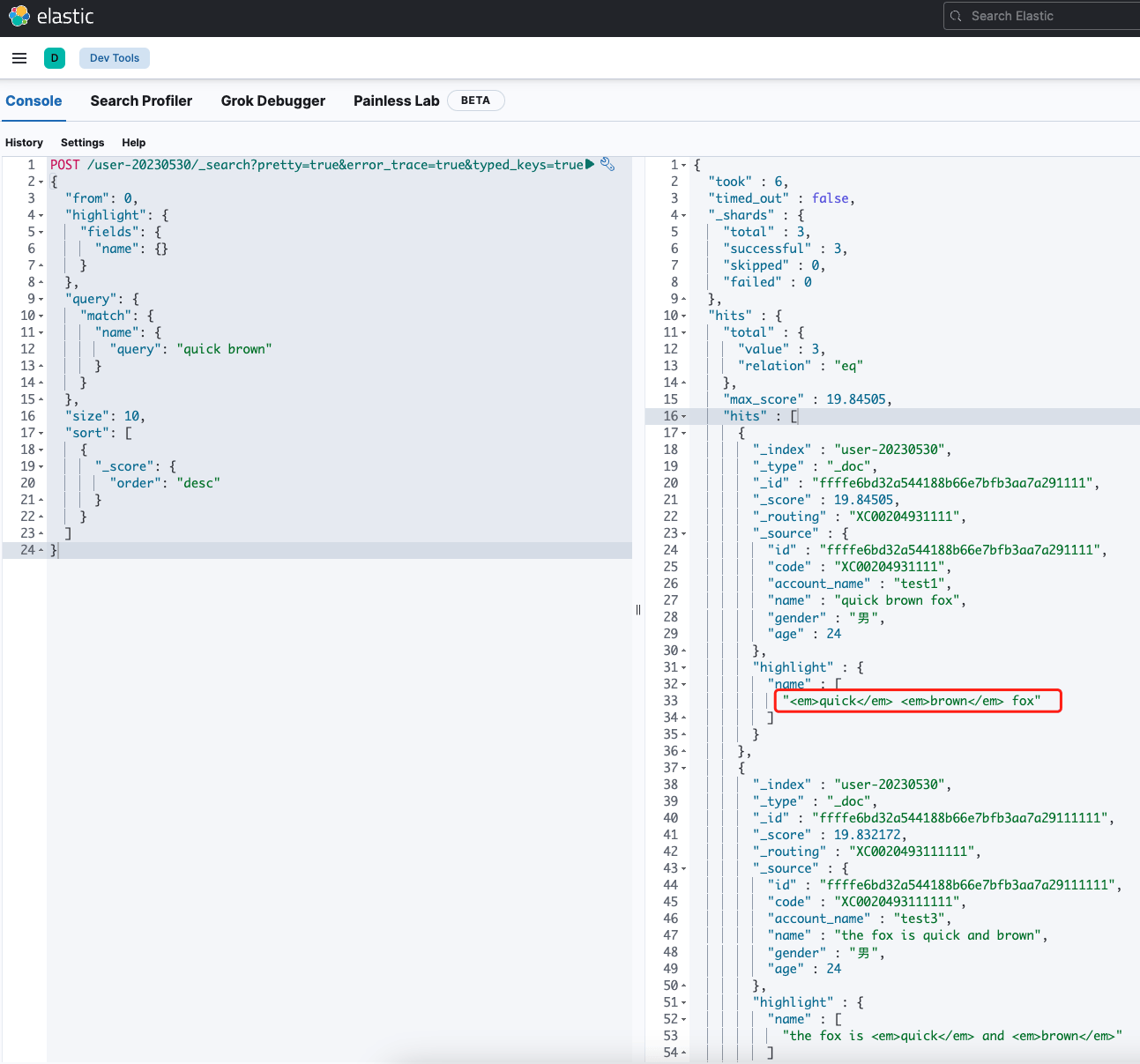
关键字高亮
 1public static void SearchByNameWithMatch(IElasticClient client, string name)
 2{
 3    var index = GetIndex();
 4    var response = client.Search<User>(s => s
 5        .Index(index)
 6        .Query(q => q
 7            .Match(m => m.Field(f => f.Name).Query(name))
 8        )
 9        .From(0)
10        .Size(10)
11        .Sort(sort => sort.Descending(SortSpecialField.Score))
12        .Highlight(hs => hs.Fields(fs => fs.Field(f => f.Name)))
13    );
14
15    foreach (var hit in response.Hits)
16    {
17        var highLight = string.Join(",", hit.Highlight?.SelectMany(h => h.Value).ToList() ?? new List<string>());
18        Console.WriteLine($"code :{hit.Source.Code}, account: {hit.Source.AccountName}, name: {hit.Source.Name}, age: {hit.Source.Age}, gender: {hit.Source.Gender}, score: {hit.Score}, highLight: {highLight}");
19    }
20}
索引的生命周期管理
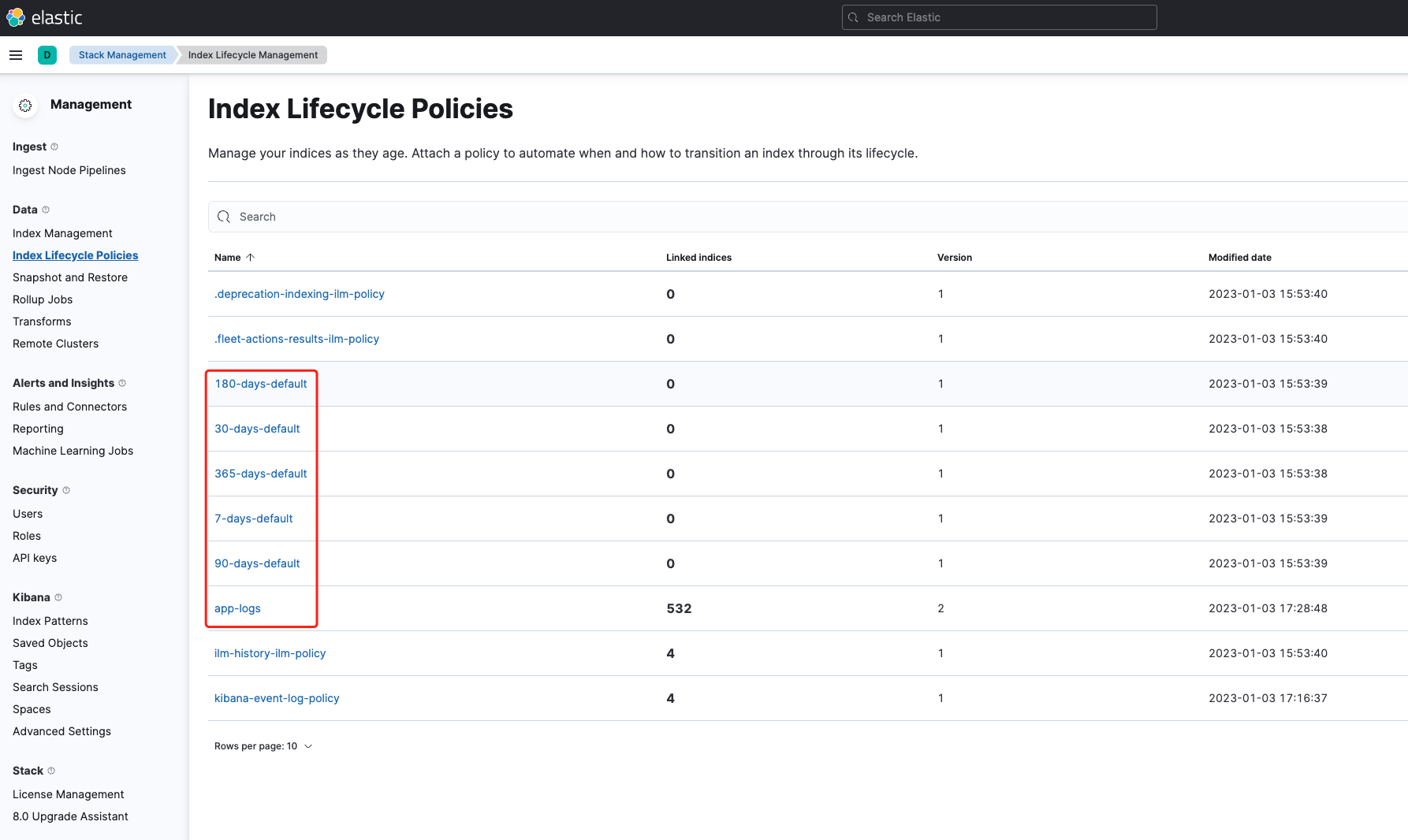
一般,ES 管理员会在 kibana 中配置一些索引的生命周期管理策略。在创建索引时,我们如果需要索引生命周期管理。添加如下配置即可。
{
  "settings": {
    "index": {
      "lifecycle": {
        "name": "app-logs"
      }
    }
  }
}